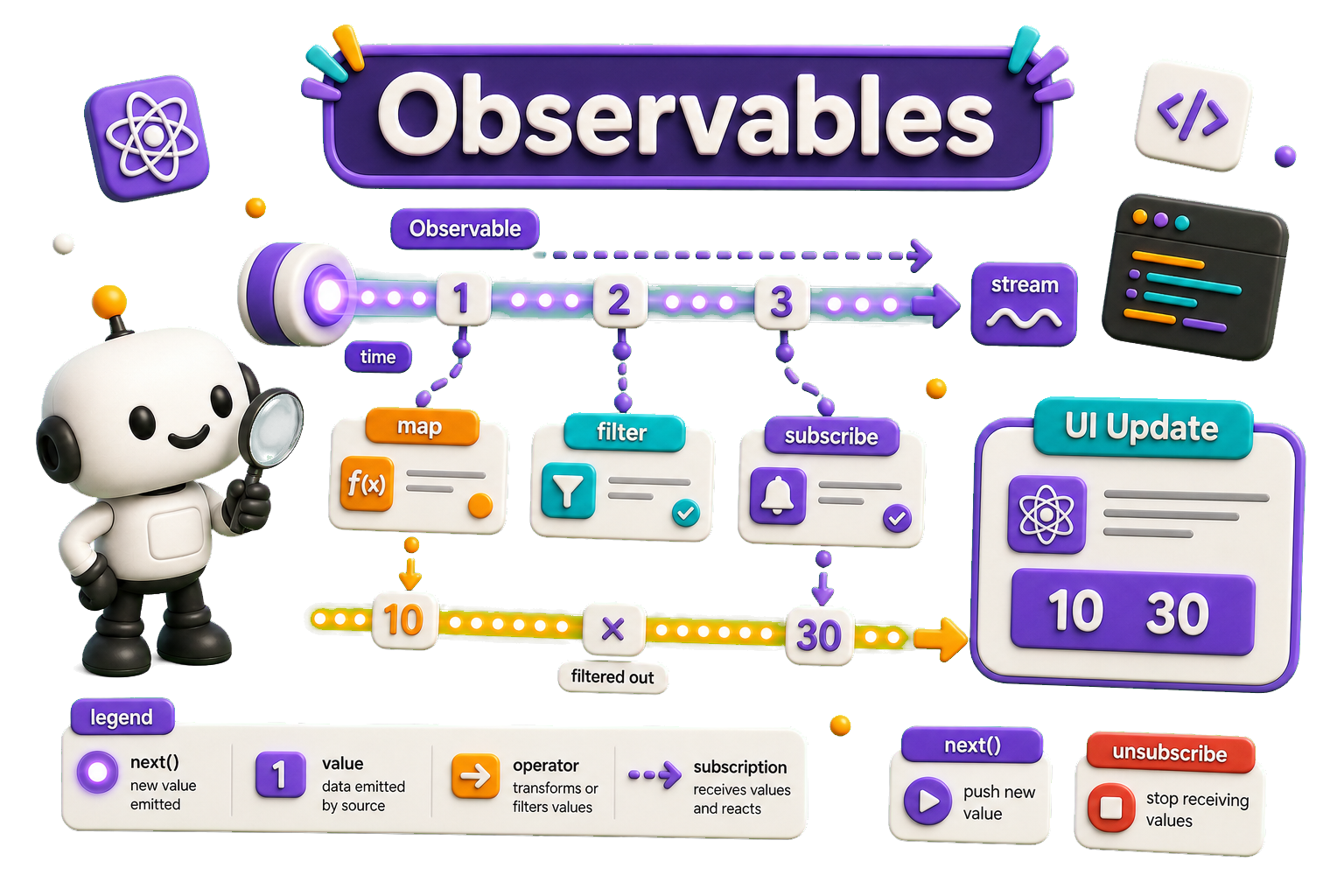
In React, observables are typically used with libraries like RxJS to handle reactive programming and manage asynchronous data streams efficiently. Observables are useful for handling events, API calls, WebSockets, and complex state management scenarios.
npm install rxjs
# or
yarn add rxjs
Example
import React, { useEffect, useState } from "react";
import { Observable } from "rxjs";

const ObservableExample = () => {
  const [count, setCount] = useState(0);

  useEffect(() => {
    // Create an Observable that emits values every second
    const observable = new Observable((subscriber) => {
      let num = 0;
      const interval = setInterval(() => {
        subscriber.next(num++); // Emit next value
      }, 1000)

      // Cleanup function
      return () => {
        clearInterval(interval)
        subscriber.complete()
      }
    })

    // Subscribe to the Observable
    const subscription = observable.subscribe((value) => {
      setCount(value as number)
    })

    // Unsubscribe when the component unmounts
    return () => subscription.unsubscribe()
  }, [])

  return (
    <div>
      <h2>Observable Example</h2>
      <p>Count: {count}</p>
    </div>
  )
}

export default App
- The Observable emits an increasing number every second.
- The
useEffecthook subscribes to the observable. - The
setCount(value)updates the component state. - When the component unmounts,
subscription.unsubscribe()stops listening to prevent memory leaks.
API Observables
You can use observables to handle API calls in React
components. This action incorporates the pipe method
of the fetch API (https://developer.mozilla.org/en-US/docs/Web/API/Fetch_API/Using_Fetch)
Here's an example using RxJS to fetch data from an API:
import React, { useEffect, useState } from "react"
import { from, of } from "rxjs"
import { switchMap, catchError } from "rxjs/operators"

/// Some API
const API_URL = "https://jsonplaceholder.typicode.com/posts/1"

const App = () => {
  const [data, setData] = useState(null)
  const [error, setError] = useState("")

  useEffect(() => {
    // Create an observable from the API fetch request
    const apiObservable = from(
        fetch(API_URL)
          .then((res) => res.json()))
          .pipe(
               switchMap((response) => of(response)), // Process response
               catchError((err) => {
                    setError("Failed to fetch data")
                    return of(null) // Handle errors gracefully
              })
         )

    // Subscribe to the observable
    const subscription = apiObservable.subscribe((result) => {
      if (result) setData(result)
    })

    // Cleanup function to unsubscribe on unmount
    return () => subscription.unsubscribe();
  }, [])

  return (
    <div>
      <h2>RxJS API Fetch Example</h2>
      {error && <p style={{ color: "red" }}>{error}</p>}
      {data ? (
        <div>
          {/*// @ts-ignore*/}
          <h3>{data?.title}</h3>
          {/*// @ts-ignore*/}
          <p>{data?.body}</p>
        </div>
      ) : (
        <p>Loading...</p>
      )}
    </div>
  )
}

export default App
What happens:
- The
from(fetch(...))converts the fetch promise into an observable. - The
switchMap()operator processes the API response. - The
catchError()operator handles any errors and prevents crashes. - The
useEffectsubscribes to the observable and updates the state. - The
cleanupfunction ensures the subscription is unsubscribed when the component unmounts.
API Call with real time search
import React, { useState, useEffect } from "react";
import {from, fromEvent, of} from "rxjs";
import { debounceTime, map, switchMap, catchError } from "rxjs/operators";

// Example API with search query
const API_URL = "https://jsonplaceholder.typicode.com/posts?q=";
const App = () => {
  const [query, setQuery] = useState("");
  const [results, setResults] = useState([]);
  const [error, setError] = useState("");

  useEffect(() => {
    const searchInput = document.getElementById("search");

    // Create an observable from input events
    const searchObservable = fromEvent(searchInput as any, "input").pipe(
      // @ts-ignore
      map((event) => event.target.value), // Get input value
      debounceTime(500), // Wait 500ms after last input
      switchMap((searchTerm) => {
        if (!searchTerm.trim()) return of([]); // Ignore empty search
        return from(
          fetch(API_URL + searchTerm).then((res) => res.json())
        ).pipe(
          catchError(() => {
            setError("Failed to fetch data" as string);
            return of([]); // Return empty array on error
          })
        );
      })
    );

    // Subscribe to the observable
    const subscription = searchObservable.subscribe((data) => {
      setResults(data);
      setError('');
    });

    // Cleanup on unmount
    return () => subscription.unsubscribe();
  }, []);

  return (
    <div>
      <h2>Live Search with RxJS</h2>
      <input
        id="search"
        type="text"
        placeholder="Search posts..."
        onChange={(e) => setQuery(e.target.value)}
      />
      {error && <p style={{ color: "red" }}>{error}</p>}
      <ul>
        {results.map((item) => (
          // @ts-ignore
          <li key={item.id}>{item.title}</li>
        ))}
      </ul>
    </div>
  );
};

export default App;